Published
JANOG53 NETCON Walkthrough (Level 4-2): iBGP and LVS
Restore redundant connectivity with iBGP and ECMP on SONiC and cEOS, then configure LVS persistence so authentication connections reach the same server.

Contents
I helped create and score the NETCON challenges at JANOG53. This post explains level 4-2.
Level 4-2 overview
Topology
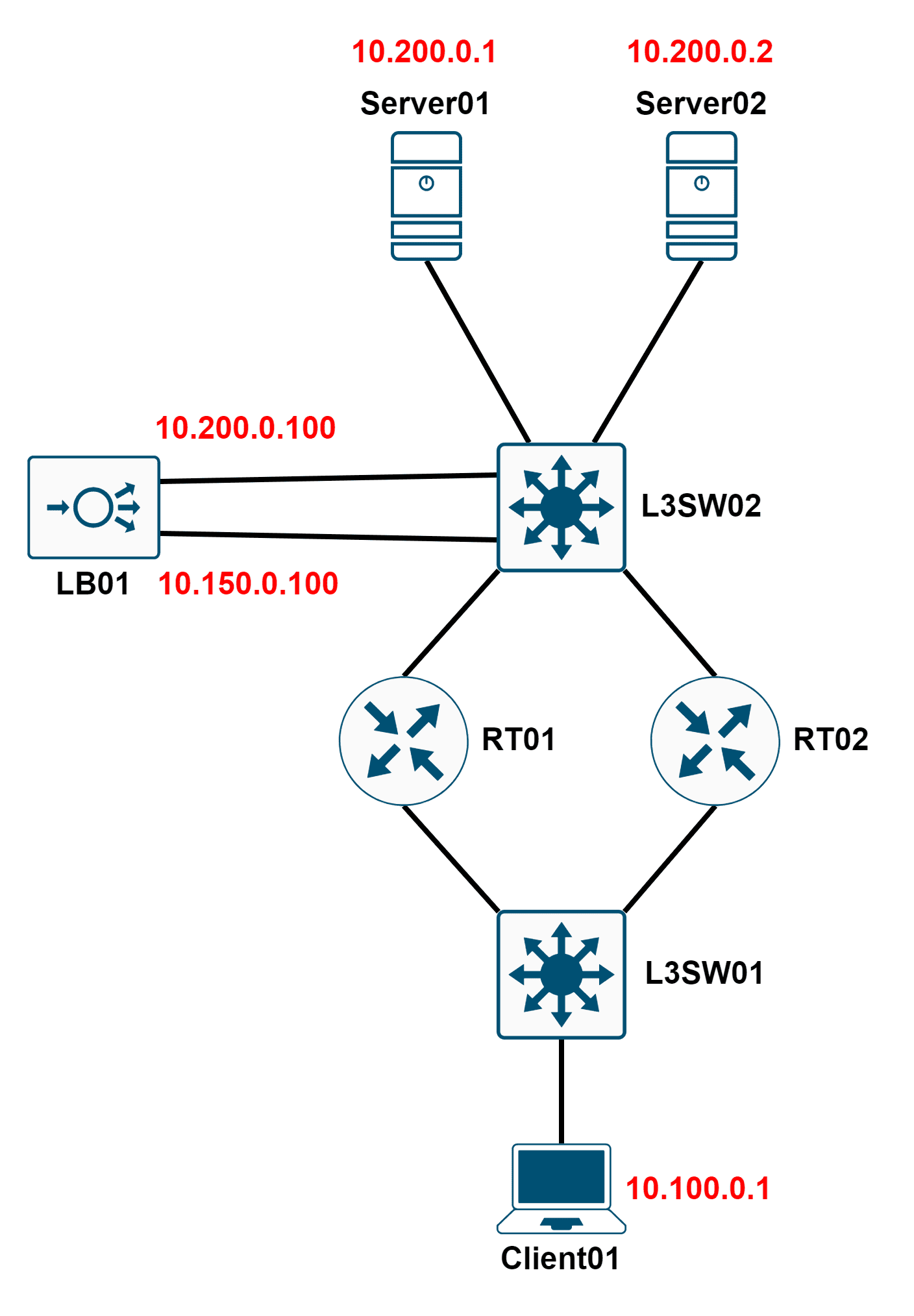
Problem statement
Redundant authentication servers sit behind LB01. Client01 sends authentication requests to LB01’s frontend IP address, 10.150.0.100.
Authentication requires multiple connections, and every connection must reach the same backend server.
The authentication program is /root/auth.py on Client01. Run it with python3 auth.py.
Currently, Client01 cannot reach 10.150.0.100, and authentication fails.
First restore connectivity to LB01’s frontend IP, then adjust the network configuration so every step of the authentication program returns OK.
Success criteria
- Client01 can reach LB01’s frontend IP, 10.150.0.100, using iBGP with ECMP redundancy.
- Backend server redundancy is preserved.
- Every result from python3 auth.py is OK.
Restrictions
- Do not edit
auth.pyon Client01. Reading it is allowed. - Establish iBGP neighbor relationships between the L3 switches and routers.
- You cannot log in to Server01 or Server02.
Environment
- L3SW01: SONiC
- RT01: cEOS
- RT02: cEOS
- L3SW02: cEOS
- Client01: Alpine Linux
- LB01: Alpine Linux, running LVS with OpenRC
- Server01: Accepts HTTP requests and returns the string Server01
- Server02: Accepts HTTP requests and returns the string Server02
Initial configuration
L3SW01 initial config – /etc/frr/zebra.conf
interface eth1
 description To_RT01
 ip address 10.11.0.2/30
 no shutdown

interface eth2
 description To_RT02
 ip address 10.21.0.2/30
 no shutdown

interface eth3
 description To_Client01
 ip address 10.100.0.254/24
 no shutdown
L3SW01 initial config – /etc/frr/bgpd.conf
router bgp 64512
 maximum-paths 100
 neighbor 10.11.0.1 remote-as 64512
 neighbor 10.11.0.1 update-source eth1
 neighbor 10.21.0.1 remote-as 64512
 neighbor 10.21.0.1 update-source eth2
 network 10.100.0.0/24
L3SW02 initial config
hostname L3SW02

interface Ethernet1
 description To_RT01
 no switchport
 ip address 10.12.0.2/30
 no shut

interface Ethernet2
 description To_RT02
 no switchport
 ip address 10.22.0.2/30
 no shut

vlan 200

interface Ethernet3
 description To_LB01_Backend_Port
 switchport mode access
 switchport access vlan 200
 no shut

interface Ethernet4
 description To_LB_Frontend_Port
 no switchport
 ip address 10.150.0.254/24
 no shut

interface Ethernet5
 description To_Server01
 switchport mode access
 switchport access vlan 200
 no shut

interface Ethernet6
 description To_Server02
 switchport mode access
 switchport access vlan 200
 no shut

interface vlan200
 description Vlan200_Gateway
 ip add 10.200.0.254/24
 no shut

ip routing

router bgp 64512
 maximum-paths 100
 neighbor 10.12.0.1 remote-as 64512
 neighbor 10.12.0.1 update-source Ethernet1
 neighbor 10.22.0.1 remote-as 64512
 neighbor 10.22.0.1 update-source Ethernet2
 network 10.200.0.0/24
RT01 initial config
hostname RT01

interface Ethernet1
 description To_L3SW01
 no switchport
 ip address 10.11.0.1/30
 no shut

interface Ethernet2
 description To_L3SW02
 no switchport
 ip address 10.12.0.1/30
 no shut

route-map Change_NH_To_10_11_0_1
 set ip next-hop 10.11.0.1
route-map Change_NH_To_10_12_0_1
 set ip next-hop 10.12.0.1

ip routing

router bgp 64512
 neighbor 10.11.0.2 remote-as 64512
 neighbor 10.11.0.2 update-source Ethernet1
 neighbor 10.12.0.2 remote-as 64512
 neighbor 10.12.0.2 update-source Ethernet2
RT02 initial config
hostname RT02

interface Ethernet1
 description To_L3SW01
 no switchport
 ip address 10.21.0.1/30
 no shut

interface Ethernet2
 description To_L3SW02
 no switchport
 ip address 10.22.0.1/30
 no shut

route-map Change_NH_To_10_21_0_1
 set ip next-hop 10.21.0.1
route-map Change_NH_To_10_22_0_1
 set ip next-hop 10.22.0.1

ip routing

router bgp 64512
 neighbor 10.21.0.2 remote-as 64512
 neighbor 10.21.0.2 update-source Ethernet1
 neighbor 10.22.0.2 remote-as 64512
 neighbor 10.22.0.2 update-source Ethernet2
auth.py
import requests
import sys

auth_url = 'http://10.150.0.100/'

class Authenticator():
    def request_authentication(self):
        try:
            response = requests.get(auth_url, timeout=1)
            content_without_empty_lines = response.text.replace('\n', '')
            return content_without_empty_lines
        except:
            print("例外が発生しました。")
            print(sys.exc_info())
            exit()

def main():
    authenticator = Authenticator()

    first_result = authenticator.request_authentication()
    for i in range(1, 11):
        tmp_result = authenticator.request_authentication()

        if first_result == tmp_result:
            print("Step" + str(i) + " = " + "OK")
        else:
            print("Step" + str(i) + " = " + "ERROR")

main()
Expected solution
1. Start bgpd on L3SW01
sed -i -e 's/bgpd=no/bgpd=yes/g' /etc/frr/daemons
service frr restart
2. Configure iBGP on L3SW02, RT01, and RT02
L3SW02
router bgp 64512
 network 10.150.0.0/24

RT01
router bgp 64512
 neighbor 10.11.0.2 route-reflector-client
 neighbor 10.11.0.2 route-map Change_NH_To_10_11_0_1 out
 neighbor 10.12.0.2 route-reflector-client
 neighbor 10.12.0.2 route-map Change_NH_To_10_12_0_1 out

RT02
router bgp 64512
 neighbor 10.21.0.2 route-reflector-client
 neighbor 10.21.0.2 route-map Change_NH_To_10_21_0_1 out
 neighbor 10.22.0.2 route-reflector-client
 neighbor 10.22.0.2 route-map Change_NH_To_10_22_0_1 out
3. Enable session persistence on LB01
ipvsadm -C
ipvsadm -A -t 10.150.0.100:80 -s rr -p
ipvsadm -a -t 10.150.0.100:80 -r 10.200.0.1:80 -m
ipvsadm -a -t 10.150.0.100:80 -r 10.200.0.2:80 -m

rc-service ipvsadm save
rc-service ipvsadm restart
Explanation
1. Starting bgpd on L3SW01
The first step is to start bgpd on L3SW01. SONiC uses FRR for its BGP implementation.
The SONiC architecture overview describes the architecture, although some parts of that document are older.
2. Configuring iBGP on L3SW02, RT01, and RT02
The routing portion required three things:
- Configure route-reflector clients.
- Set the next hop to the advertising router, using either route-maps or next-hop-self.
- Advertise 10.150.0.0/24.
A working authentication program alone did not satisfy all requirements. Solutions using static routes or lacking ECMP redundancy lost points.
3. Enabling session persistence on LB01
Some applications require separate connections to reach the same backend server. The authentication program reproduces that requirement in a simple way.
The expected solution enabled session persistence using LVS’s -p option. Using the sh scheduling method, or source hashing, was also accepted.
Some submissions used lblc. Depending on server load, it may fail to meet the application’s requirement. Those solutions lost points.
Although lblc assigns connections for the same destination IP to the same server, it can select another server depending on load and availability. See the ipvsadm manual for its scheduling behavior.
My knowledge of LVS is still limited, so I welcome corrections to that interpretation.
With these changes, every step of auth.py returns OK.
Closing thoughts
Thank you to everyone who worked on this challenge.
Reading the submissions made me realize that some assumptions in the problem statement could have been clearer. I will carry those lessons into future challenges.
I hope this problem offered a useful introduction to SONiC and LVS.