Published
JANOG51 NETCON Walkthrough (Level 1-1): VLANs and Trunk Ports
Restore connectivity for VLANs 1 and 10 by identifying an access-mode link between two switches and configuring trunk ports.

This post publishes the JANOG51 NETCON level 1-1 walkthrough on behalf of its author.
Thank you to 進士 for creating the challenge.
The explanation below is from the challenge author.
Topology
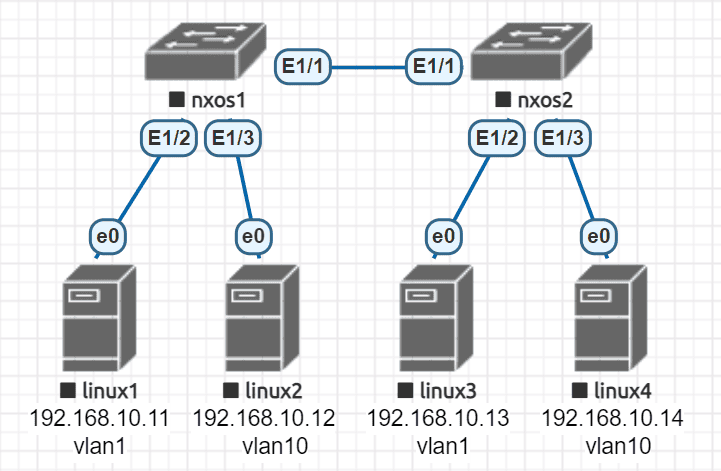
Problem statement
A student is studying networking and configures VLANs using two switches and several PCs.
After completing the configuration, ping tests reveal that linux2 and linux4 cannot communicate.
Change the switch configuration so that the PCs that should be able to communicate can do so.
Restrictions
- Do not change the VLAN IDs.
- Do not add IP addresses to interfaces on the Linux containers.
Walkthrough
Issue
The ports connecting the switches, Ethernet1/1 on each switch, are configured in access mode. As a result, only VLAN 1 frames cross the link.
The inter-switch link must carry frames for both VLAN 1 and VLAN 10.
Solution
Configure Ethernet1/1 as a trunk port on both switches.
nxos1# conf t
nxos1(config)# interface ethernet 1/1
nxos1(config-if)# switchport mode trunk

nxos2# conf t
nxos2(config)# interface ethernet 1/1
nxos2(config-if)# switchport mode trunk
Scoring
The challenge used automated scoring with three checks:
- Ping succeeds between linux1 and linux3, and between linux2 and linux4.
- Ping fails between all other PC pairings.
- No IP address has been added to linux2’s interface.
Meeting all three requirements earned 100%, or 30 points. Any other result earned zero.
Closing thoughts
Level 1-1 focused on the difference between VLAN access ports and trunk ports. The symptom that linux2 and linux4 could not communicate helped many participants identify the issue.
As the first level 1 challenge, it attracted many submissions.
Thank you to everyone who participated in JANOG51 NETCON.