Published / Updated
JANOG50 NETCON Walkthrough (Level 3-4): BGP over IPsec
Troubleshoot an IKEv2 proposal mismatch and recursive routing that causes a BGP-over-IPsec tunnel to flap, using only the local router.

Contents
I helped create the NETCON challenges for JANOG50. This post explains level 3-4.
Level 3-4 overview
BGP over IPsec is not working between two sites. The challenge requires troubleshooting both IPsec and BGP.
You cannot log in to the router at the remote site. This deliberately makes debug commands an essential part of the investigation.
Topology
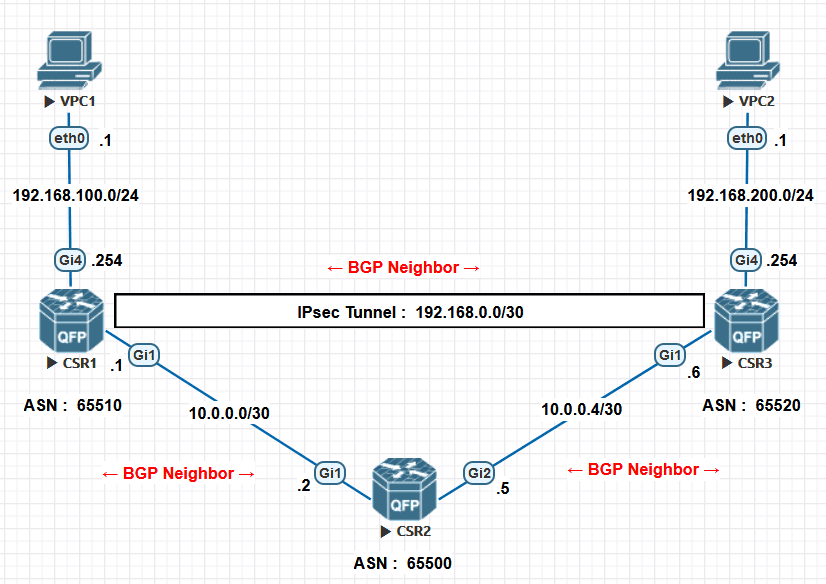
Problem statement
You are configuring an IPsec tunnel at the Hakodate site (CSR1), while your manager works at the Tokyo site (CSR3). Your manager finishes the configuration and leaves to celebrate a wedding anniversary.
You finish your configuration too, but the IPsec tunnel does not come up.
Troubleshooting has confirmed that IPsec packets reach the other end, so the IP addresses and transport path appear to be correct. You cannot reach your manager, but the tunnel must be working today.
You cannot log in to CSR3. Establish the tunnel by changing CSR1 only.
Task 1: Modify CSR1’s configuration to establish the IPsec tunnel.
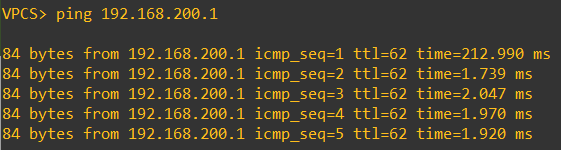
Task 2: The tunnel now establishes, but its interface flaps and the VPCs cannot communicate. Add configuration to CSR1 and confirm that a ping from VPC1 (192.168.100.1) to VPC2 (192.168.200.1) succeeds.
Initial CSR1 configuration
interface gigabitethernet 1
 ip address 10.0.0.1 255.255.255.252
 no shutdown

interface gigabitethernet 4
 ip address 192.168.100.254 255.255.255.0
 no shutdown

interface tunnel 1
 ip address 192.168.0.1 255.255.255.252
 ip mtu 1400
 tunnel mode ipsec ipv4
 tunnel source gigabitethernet 1
 tunnel destination 10.0.0.6
 tunnel protection ipsec profile profile-for-csr3
 no shutdown

ip prefix-list local-networks seq 10 permit 192.168.100.0/24
ip prefix-list provider-networks seq 10 permit 10.0.0.0/30

router bgp 65510
 neighbor 10.0.0.2 remote-as 65500
 neighbor 10.0.0.2 update-source GigabitEthernet1
 neighbor 192.168.0.2 remote-as 65520
 neighbor 192.168.0.2 update-source Tunnel1

 address-family ipv4 unicast
  neighbor 10.0.0.2 activate
  neighbor 10.0.0.2 prefix-list provider-networks out
  neighbor 192.168.0.2 activate
  neighbor 192.168.0.2 prefix-list local-networks out
  network 10.0.0.0 mask 255.255.255.252
  network 192.168.100.0 mask 255.255.255.0

crypto ikev2 proposal proposal-for-csr3
 encryption aes-cbc-256 aes-cbc-128
 group 14
 integrity sha256 sha1

crypto ikev2 policy policy-for-csr3
 proposal proposal-for-csr3

crypto ikev2 keyring keyring-for-csr3
 peer csr3
 address 10.0.0.6 255.255.255.252
 pre-shared-key local cisco
 pre-shared-key remote cisco

crypto ikev2 profile profile-for-csr3
 match identity remote address 10.0.0.6 255.255.255.252
 identity local address 10.0.0.1
 authentication local pre-share
 authentication remote pre-share
 keyring local keyring-for-csr3
 lifetime 28800

crypto ipsec transform-set transformset-for-csr3 esp-aes esp-sha256-hmac
 mode tunnel

crypto ipsec profile profile-for-csr3
 set transform-set transformset-for-csr3
 set ikev2-profile profile-for-csr3
 set security-association lifetime seconds 28800
 set security-association lifetime kilobytes 102400000
 responder-only
Answers
Task 1 Change the IKEv2 proposal on CSR1.
Before:
crypto ikev2 proposal proposal-for-csr3
 encryption aes-cbc-256 aes-cbc-128
 group 14
 integrity sha256 sha1
After:
crypto ikev2 proposal proposal-for-csr3
 encryption aes-cbc-192
 group 24
 integrity sha512
Task 2 Add an inbound prefix filter for the BGP neighbor across the tunnel.
Additional configuration:
ip prefix-list block-routes seq 10 deny 10.0.0.4/30
ip prefix-list block-routes seq 20 permit 0.0.0.0/0 le 32

router bgp 65510
address-family ipv4 unicast
 neighbor 192.168.0.2 prefix-list block-routes in
Walkthrough
Task 1: IKEv2 proposal mismatch
The only initial symptom is that IPsec does not connect. Start with show commands to collect more information.
show crypto ikev2 sa shows that no IKE SA has been established.

show crypto ipsec sa shows that the IPsec SAs have not been established either.
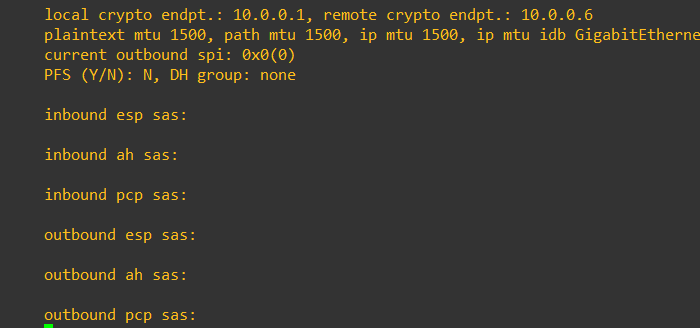
Next, use debug commands to investigate why IKE negotiation fails.
debug crypto ikev2
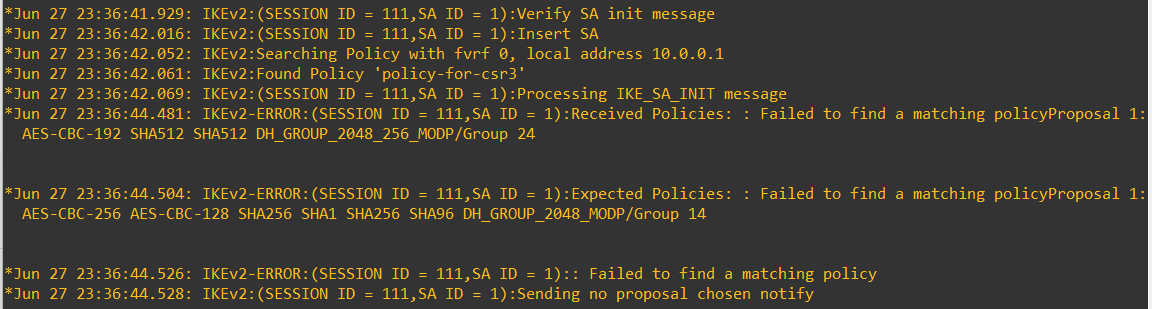
The received proposal and the locally expected proposal differ:
Received Policies = AES-CBC-192 SHA512 SHA512 DH_GROUP_2048_256_MODP/Group 24
Expected Policies = AES-CBC-256 AES-CBC-128 SHA256 SHA1 SHA256 SHA96 DH_GROUP_2048_256_MODP/Group 14
Match the local proposal to the remote router’s configuration.
The corrected configuration is:
crypto ikev2 proposal proposal-for-csr3
 encryption aes-cbc-192
 group 24
 integrity sha512
After the change, the log confirms that both the IKE SA and the IPsec SA have been created.
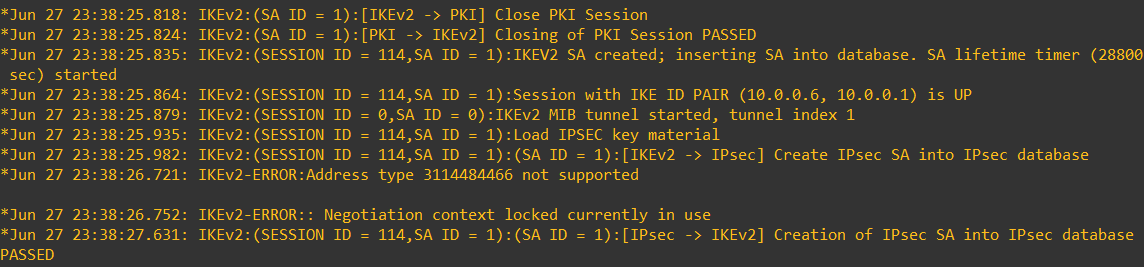
This completes task 1.
If further investigation of IPsec SA negotiation were needed, debug crypto ipsec would also be useful.
Task 2: Recursive routing
The syslog messages show Tunnel1 flapping because of recursive routing.
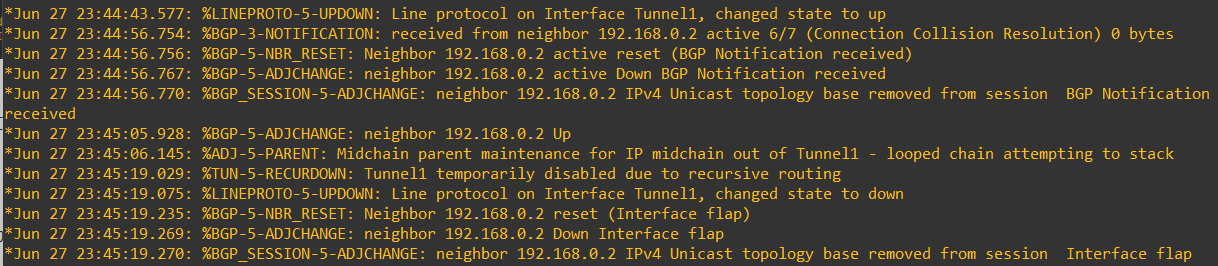
The sequence is:
- Tunnel1 comes up.
- The BGP neighbor across the tunnel comes up.
- The router detects recursive routing and brings Tunnel1 down.
- The BGP neighbor goes down as well.
This suggests that learning a BGP route triggers unintended recursive routing and causes the interface to flap.
The following debug command is useful for inspecting the learned routes.
debug ip bgp updates
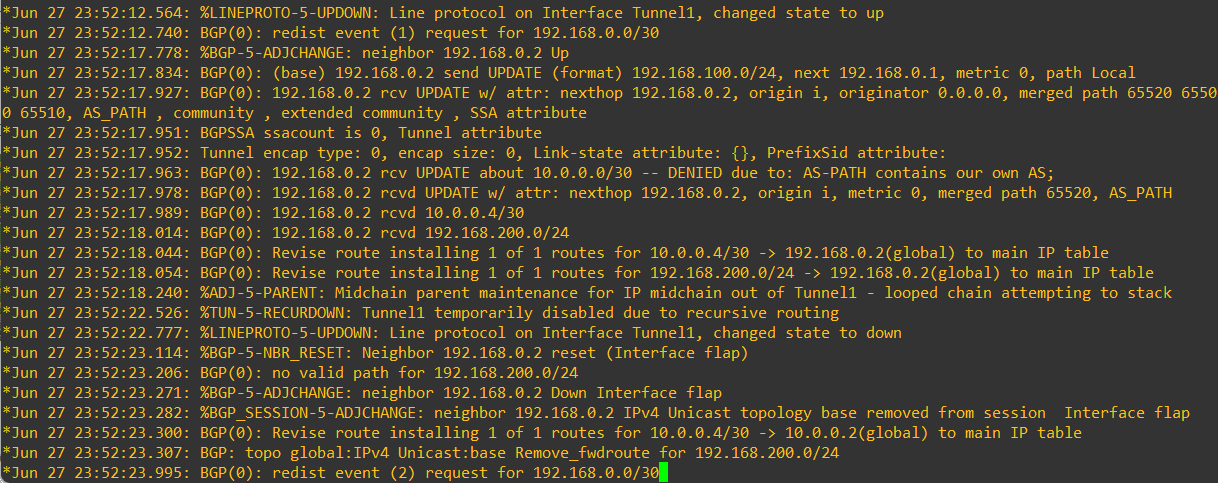
CSR1 receives these routes from neighbor 192.168.0.2:
- 10.0.0.0/30, which is not installed in the RIB because the directly connected route takes precedence
- 10.0.0.4/30
- 192.168.200.0/24
Now look at the topology.
10.0.0.4/30 appears to be learned through both the underlay and the overlay IPsec tunnel.
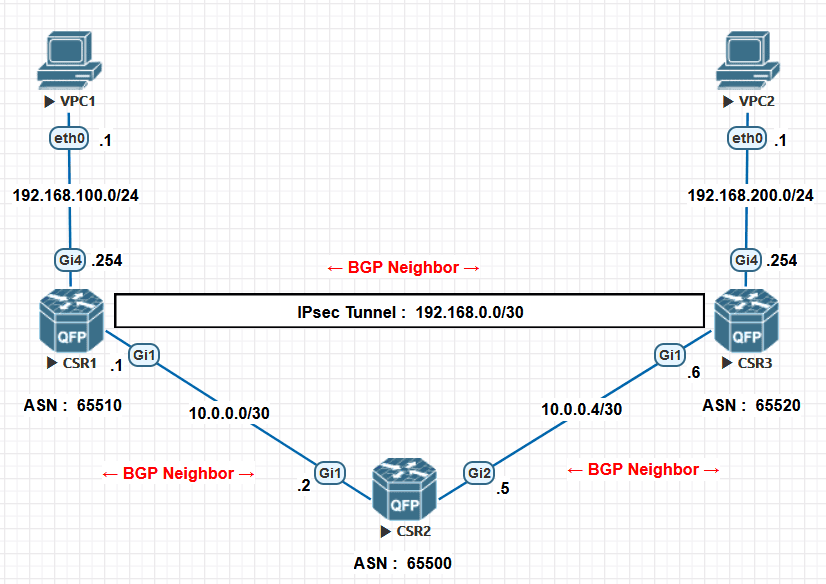
Test that hypothesis.
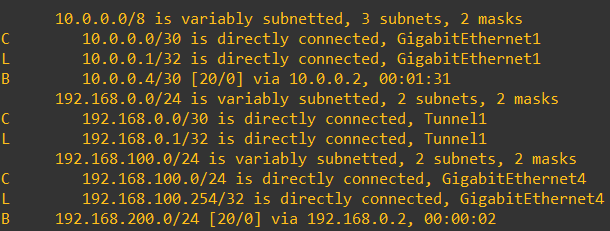
Compare show ip route before and immediately after the BGP neighbor at 192.168.0.2 comes up. The route to 10.0.0.4/30 is learned from neighbors 10.0.0.2 and 192.168.0.2, causing recursive routing and interface flapping.
Before the tunnel BGP session comes up:
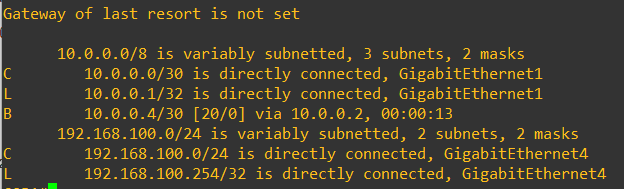
Immediately after it comes up:
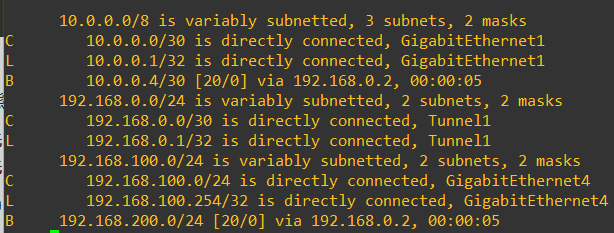
The same prefix, 10.0.0.4/30, is learned from neighbors 10.0.0.2 and 192.168.0.2. Because of the AS path difference, the route learned through the IPsec tunnel replaces the original route:
Destination = 10.0.0.4/30, next hop = 10.0.0.2- Destination = 10.0.0.4/30, next hop = 192.168.0.2
The tunnel’s destination address belongs to 10.0.0.4/30. Once the route to that network points into the tunnel itself, the router cannot resolve the tunnel destination independently of the tunnel. It detects recursive routing and reports the error.
Filtering either advertised routes or received routes can resolve this. Since the remote router is unavailable, filter the route on the local router as it is received.
Add the following configuration to the local router:
ip prefix-list block-routes seq 10 deny 10.0.0.4/30
ip prefix-list block-routes seq 20 permit 0.0.0.0/0 le 32

router bgp 65510
address-family ipv4 unicast
 neighbor 192.168.0.2 prefix-list block-routes in
After filtering, BGP stops flapping and the routing table looks like this:
Finally, verify connectivity with ping between the VPCs.