公開
WebMCP 対応させてみた
最近 Cloudflare が WebMCP 対応を発表したことで話題になりましたね。まだ広く利用できる状態ではないですが、このブログも WebMCP に対応してみました。

WebMCP とは
現在の Web サイトは人間が見て人間が操作する前提で作られていますが、これを AI Agent でも利用しやすくするための規格が WebMCP です。
人間向けの Web サイトであっても AI Agent は DOM を解析したり playwright でページを操作することが可能ですが、WebMCP によって効率的にページの構造や機能を効率的に判別、利用することが出来るようになります。
WebMCP のプロジェクトでも以下の様な説明がされています。 https://github.com/webmachinelearning/webmcp
The motivation of WebMCP is to provide a lightweight way to adapt web content for use by AI agents.
EC サイトでの買い物や旅行の予約を AI が代行する、関連するページ一覧を取得してユーザーの要求に近いものを見つける。こういった操作が効率的に行えるようになると理解しています。
このブログは特に AI Agent 向けに利用させたい機能はないのですが、簡単にできそうなのと面白そうだったのでとりあえず対応させてみました。
仕様はまだ定まっていない
現時点で WebMCP に対応させる場合、頻繁に仕様が変更されている点に注意が必要です。エンタープライズで Web MCP が本運用に載るのはまだまだ先かなと思います。
例えば以下のように、すでに非推奨となっているような構文もあります。 https://developer.chrome.com/docs/ai/webmcp/imperative-api?hl=ja
注: navigator.modelContext は Chrome 150 で非推奨になりました。代わりに document.modelContext を使用してください。
命令型 API と宣言型 API
WebMCP でツールを定義する方法は 2 種類あります。
命令型 API は JavaScript でツールを定義するもので、document.modelContext.registerTool() を呼びます。フォーム入力に限らず、ナビゲーションや状態管理など、いろいろな種類のツールを作れます。
document.modelContext.registerTool({
  name: "search_posts",
  description: "Search published blog posts by keyword.",
  inputSchema: {
    type: "object",
    properties: { query: { type: "string" } },
    required: ["query"],
  },
  execute: async ({ query }) => ({
    content: [{ type: "text", text: JSON.stringify(search(query)) }],
  }),
});
一方の宣言型 API は、既存の HTML フォームに属性を足すだけで済みます。JavaScript を書く必要がありません。
<form toolname="createSupportRequest"
      tooldescription="Submits a request for customer support.">
  <label for="firstName">First Name</label>
  <input type="text" name="firstName">

  <select name="select" required
    toolparamdescription="Determines what team this request is routed to.">
    <option value="Customer happiness team">Return my purchase.</option>
  </select>

  <button type="submit">Submit</button>
</form>
toolname でツール名、tooldescription で説明、toolparamdescription で各入力欄の説明を書きます。ブラウザがこれを、命令型で定義したときと同じ構造化された表現に変換してエージェントへ渡してくれます。
問い合わせフォームや予約フォームのように、もともとフォームがあるページなら宣言型のほうが手軽そうです。ただしフォーム限定なので、今回作りたかった記事検索のように「フォームが存在しない機能」は命令型で書くことになります。
実際に対応させてみた
別に WebMCP である必要は全くないですが、とりあえず記事検索機能をつけてみました。
本ブログは Astro で動いているため、ビルド時に記事一覧 json を生成し、それを WebMCP から検索できるようにしています。
生成された json のサンプルです。
{
  "locale": "ja",
  "url": "/posts/cross-root-certificate-digicert-g5/",
  "title": "クロスルート証明書とは何か:DigiCert の G5 移行を読み解くために",
  "description": "DigiCert の G5 ルート階層への移行に合わせて、クロスルート証明書の仕組みと、既存の G1 → G5 チェーンをどう評価すべきかを整理します。",
  "date": "2026-08-05",
  "category": "security",
  "tags": ["tls", "digicert"],
  "keywords": ["中間証明書", "ルート証明書", "クロスルート証明書", "PKI", "OpenSSL", "TLS"],
  "headings": ["証明書チェーンの前提知識", "DigiCert のルート証明書の呼び方"],
  "translationUrl": "/en/posts/cross-root-certificate-digicert-g5/"
}
WebMCP のサンプルです。上記の json を読んで検索するツールを登録しています。
if (!window.isSecureContext) return;
const provider = document.modelContext;
if (!provider || typeof provider.registerTool !== "function") return;

provider.registerTool({
  name: "search_eta404_posts",
  description:
    "Search published blog posts on ETA 404 by keyword, category, or tag. " +
    "Use this to find articles on this site instead of guessing URLs.",
  inputSchema: {
    type: "object",
    properties: {
      query: { type: "string", description: "Keywords to search for." },
      category: { type: "string", enum: ["web-development", "network", "security", "ai", "blog"] },
      tag: { type: "string", enum: ["astro", "cloudflare", "tls", "webmcp"] },
      locale: { type: "string", enum: ["ja", "en", "all"] },
      limit: { type: "integer", minimum: 1, maximum: 50 },
    },
  },
  annotations: { readOnlyHint: true },
  execute: async (input) => {
    const index = await loadIndex();
    const results = search(index.posts, input);

    return {
      content: [
        { type: "text", text: JSON.stringify({ count: results.length, results }) },
      ],
    };
  },
});
annotations は付けておくとよさそうです。readOnlyHint は読み取り専用であることを示すもので、エージェントが確認ダイアログなしで呼べるようになります。
Chrome で WebMCP を利用してみる
chrome://flags/#enable-webmcp-testingを Enabled にして、Relaunch でブラウザを再起動- DevTools → Application タブ → サイドバーの WebMCP を選択
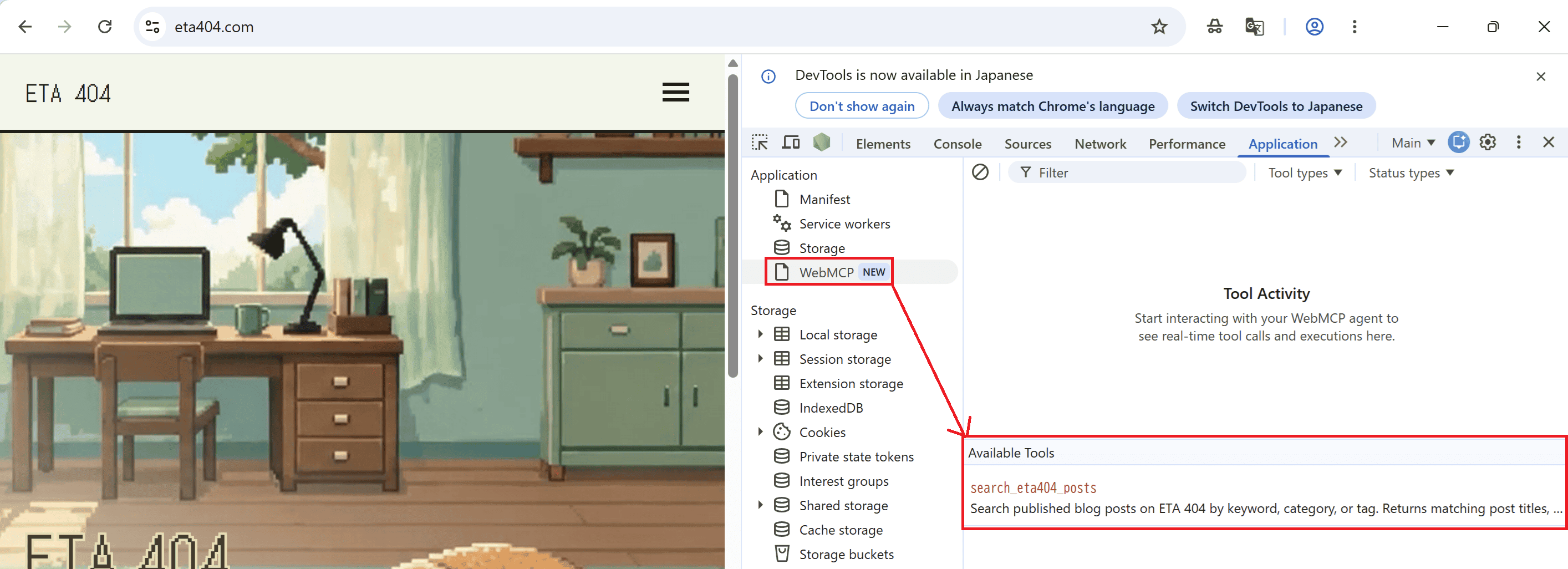
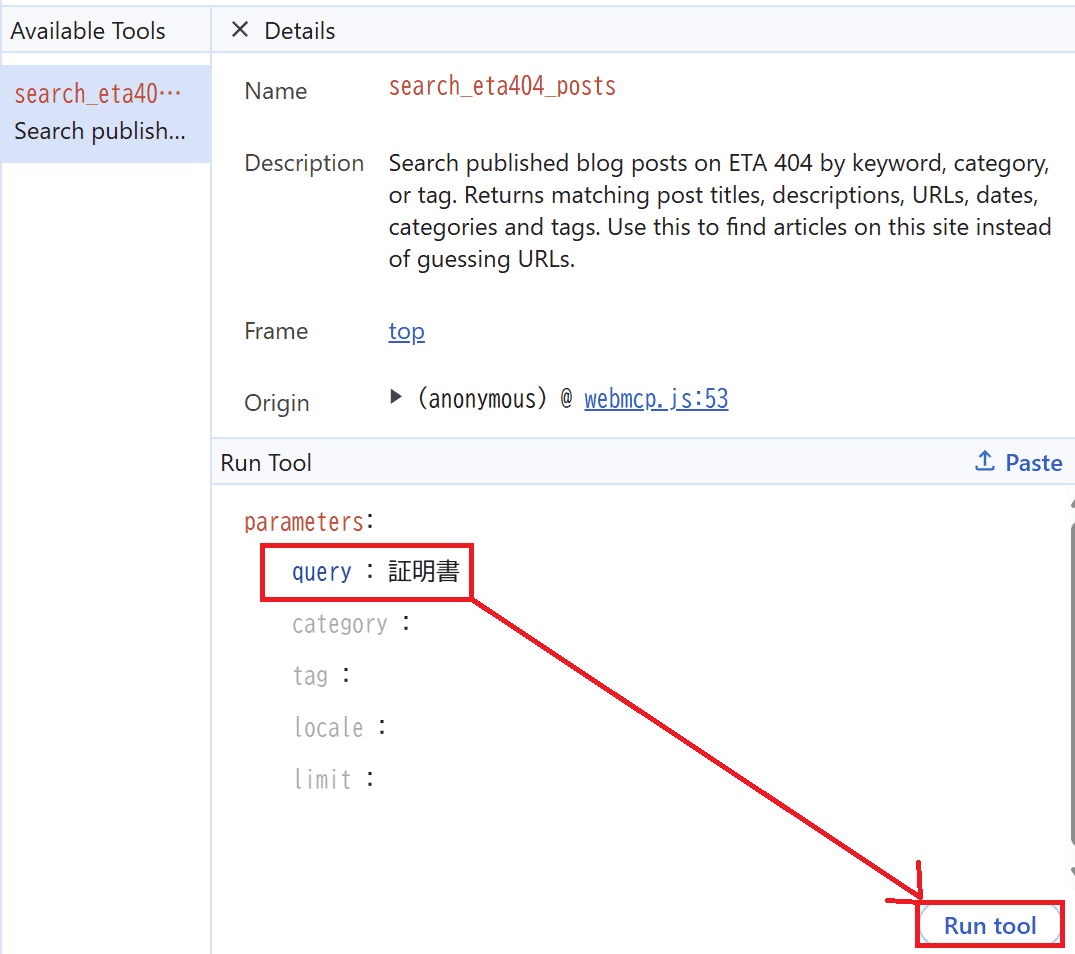
- ツールを選ぶとパラメータの入力欄が開くので、適当な値を入れて実行
- Output を確認する
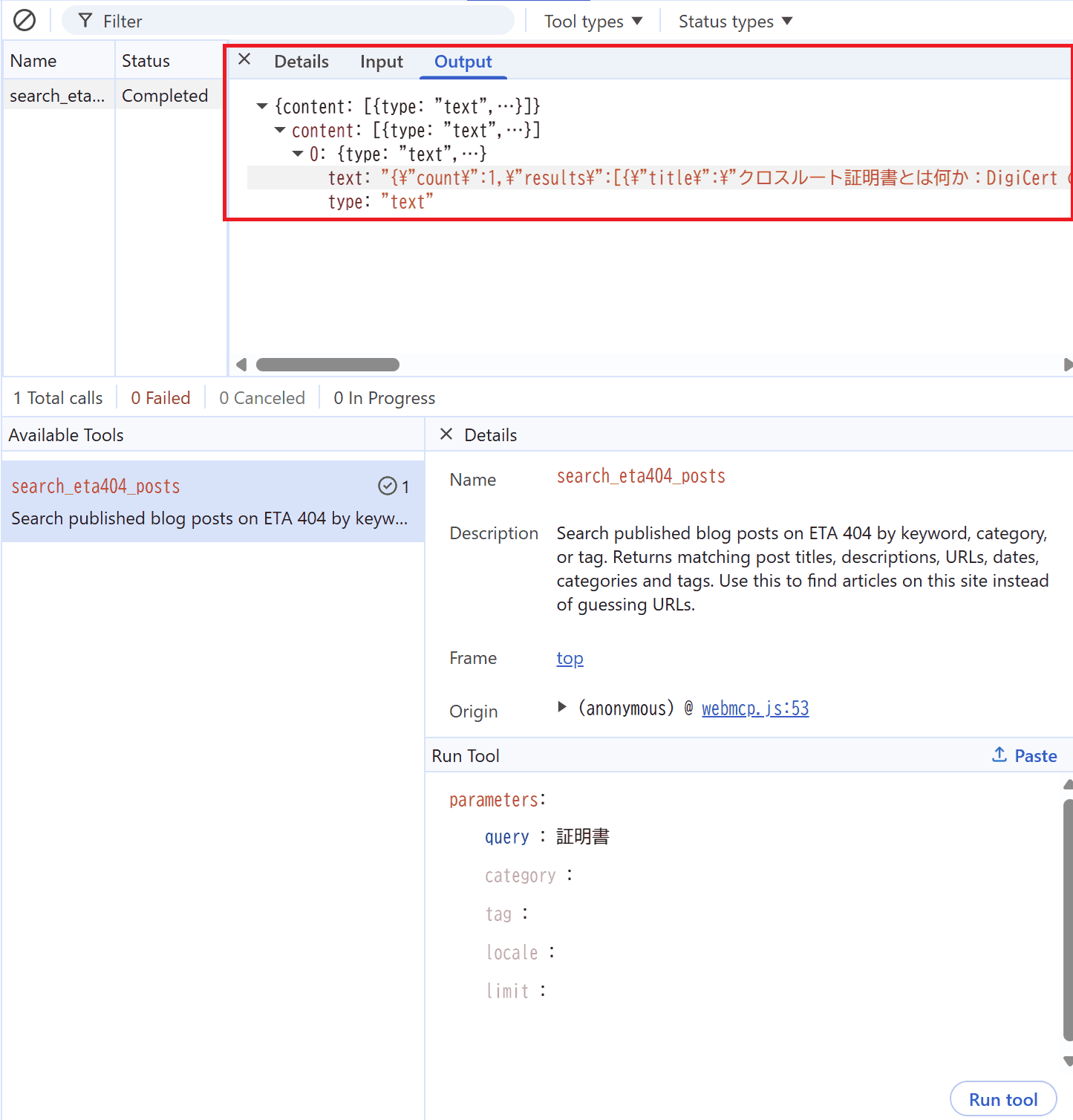
手で試したら WebMCP の意味がないんですが、AI Agent から呼べる環境を作るのが面倒だったのでそこまで試していませんw
将来的に Gemini in Chrome 等が正式に対応したら改めて試してみようと思います。
まとめ
現時点では仕様も揺れており広く導入されるのはまだまだ先かなという印象です。ただ、今後もしかすると SEO にも関わってきたりするのかなとぼんやり考えており、今のうちから試せてよかったなと思います。